
Hello, I’m Wellington Duarte, a LearnDash Developer, and this is the beginning of a new series where I’ll be reviewing every official LearnDash add-on (both free and premium) and sharing my honest opinion after working with them.
Today we’re starting with the LearnDash Notifications Add-on. If you’re looking for a complete installation tutorial, I recommend following the official documentation, which explains the setup process step by step.
This series isn’t meant to replace the official documentation. My goal is to share a real user’s perspective and help you decide whether an add-on is actually worth using, what it does well, where it falls short, and whether there are better alternatives depending on your project.
💡 What to expect from this review
- My personal experience using the add-on.
- The features I actually find useful.
- Its biggest limitations.
- Who I recommend it for.
- Alternative plugins worth considering.
What Is the LearnDash Notifications Add-on?
In short, this add-on solves one of the most common needs in any online course platform: automated notifications.
Let’s say Peter just completed a course. It makes sense to notify both Peter and the course administrator, right?
That’s exactly what this add-on does.
It allows LearnDash to automatically send emails whenever specific events happen inside your LMS. These events can be very simple, such as a student completing a lesson or failing a quiz, or more strategic, like sending a reminder when someone hasn’t logged into their course for several days.
It can also handle important notifications, such as warning students a few days before their course expires.
If you think about it, the LearnDash Notifications Add-on provides the basic automation features that most LMS websites need without requiring an external marketing automation platform.
We’ll look at its strongest features next.
Installation
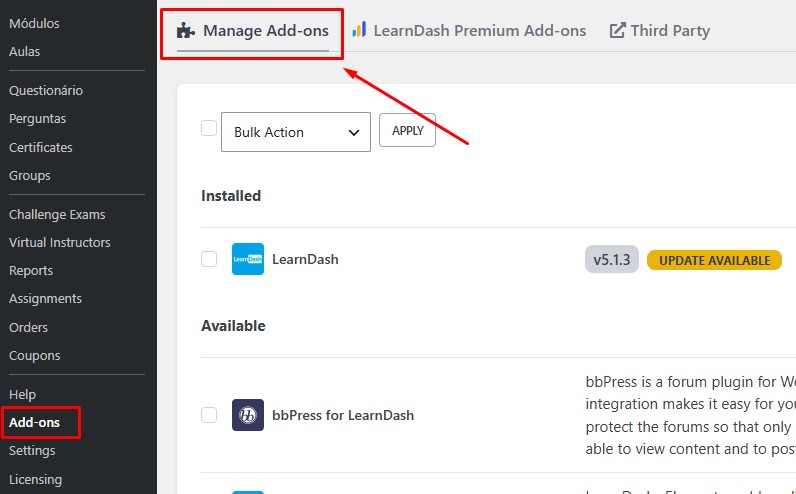
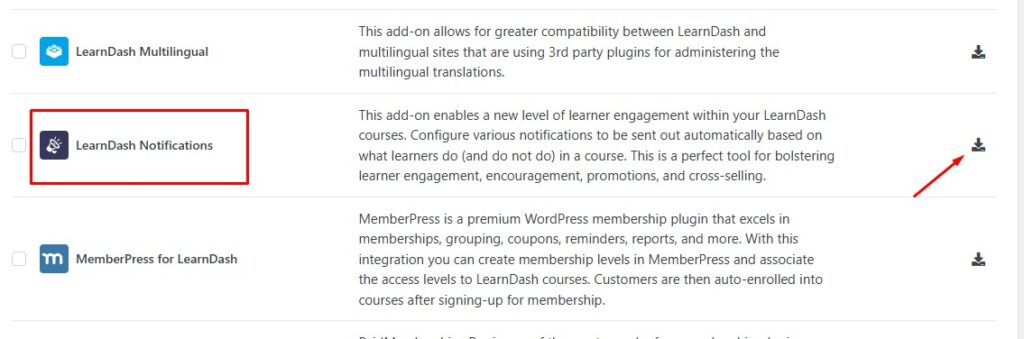
Installing the LearnDash Notifications Add-on is straightforward.
Simply open the LearnDash → Add-ons page inside your WordPress dashboard, locate the Notifications Add-on, and click Install.
If you’ve never installed an official LearnDash add-on before, I recommend following the official installation guide:
Official LearnDash Notifications Documentation
I won’t spend much time covering the installation process here because it’s already well documented. Instead, I’d rather focus on how the add-on performs in real-world projects.
Key Features
As I mentioned earlier, notifications play an important role in keeping an LMS active and engaging. Even simple emails can significantly improve the student experience when they’re sent at the right moment.
Here are the features I found most useful while working with this add-on.
Multiple Notification Triggers
The plugin includes a good variety of triggers throughout the student’s learning journey. You can trigger emails when users complete lessons, quizzes, topics, assignments, courses, stay inactive for a number of days, and several other events.
Dynamic Email Shortcodes
You can personalize emails using built-in LearnDash shortcodes. Besides the student’s name, you can insert course information, completion dates, links, scores, and several other dynamic values.
Conditional Rules
Another feature I like is the ability to add conditions before sending a notification, for example sending a completion email only if the student has submitted an essay. These conditions aren’t extremely advanced, but they’re useful for many common scenarios.
Native LearnDash Integration
Because it’s an official add-on, compatibility isn’t something you usually need to worry about. Email templates are created directly inside the WordPress editor and can be customized with HTML if needed. One limitation, however, is that it doesn’t integrate with Gutenberg blocks or Elementor, something I’ll discuss later in this review.
Notifications for Different User Roles
Notifications aren’t limited to students. You can send emails to Students, Group Leaders, Course Administrators, and Custom WordPress roles. This gives you enough flexibility for most standard LMS projects.
Shortcode example:
Hey, [ld_notifications field="user" show="first_name"]!
You just completed a course! 🎉
Where This Add-on Excels 🏆
Overall, I think LearnDash Notifications is a really solid native add-on.
It does exactly what most LMS websites need: notify students, instructors, and administrators when something important happens inside a course. It keeps things simple, and in many cases, that’s exactly what you want.
⚠️ Before you start
Before using it, make sure your WordPress email delivery is properly configured. Otherwise, your notifications may never reach your users, regardless of how well the add-on is configured.
My Opinion
I’m a big fan of simple solutions, and I think LearnDash Notifications does a good job of focusing on what it’s supposed to do. It’s important not to confuse a notification add-on with a complete marketing automation platform. They’re built for different purposes.
For small and medium-sized LMS websites, I would definitely recommend using it. Since it’s an official LearnDash add-on, you also have access to LearnDash support if you ever run into problems.
If you’re wondering whether this add-on covers your needs, ask yourself one simple question:
What types of notifications do I actually need to send?
These are some of the events currently supported:
| Trigger | Supported |
|---|---|
| User enrolled in a group | ✅ |
| User enrolled in a course | ✅ |
| Course completed | ✅ |
| Lesson completed | ✅ |
| Topic completed | ✅ |
| Quiz submitted | ✅ |
| Quiz completed | ✅ |
| Essay submitted | ✅ |
| Essay graded | ✅ |
| Assignment uploaded | ✅ |
| Assignment approved | ✅ |
| Quiz not completed | ✅ |
If all you need is what’s listed above, this add-on will probably do the job.
If your workflow requires advanced automation, CRM integration, multiple communication channels, or highly customized logic, you’ll probably want a more powerful solution.
Where This Add-on Falls Short 😞
Looking at what this add-on promises to do, I think it does a good job overall. However, I also noticed that development has slowed down over the last couple of years. Most updates since 2024 have focused on maintenance and bug fixes rather than new features.
Here are a few improvements I’d personally like to see in future versions.
Better Gutenberg and Elementor Support
I’ll be honest, it took me a while to fully embrace Gutenberg in my own projects. Today, however, almost every major WordPress plugin supports the block editor in one way or another. When you’re building notification emails or reusable templates, having access to modern visual editing tools makes a huge difference.
Webhook Support
This is probably the feature I’d like to see the most. Being able to send notification data to services like Zapier or Make would open the door to CRM integrations, WhatsApp notifications, Slack messages, Microsoft Teams, and countless other workflows. It would instantly make this add-on much more flexible.
More Advanced Conditions
Current conditions work well for simple scenarios. But imagine wanting to notify only students who belong to a specific group and completed a course within seven days. More advanced conditional logic would make the add-on much more powerful without making it difficult to use.
A Notification Center for Students
The WordPress dashboard works perfectly for administrators, but students don’t have their own notification center inside the LMS. I think having a small notification bell or inbox where students could review previous notifications would improve the overall learning experience.
More Attention from the Development Team
One small detail that bothered me was the installation page itself.
When I clicked “Explore Premium Add-ons”, I expected to see detailed information about the premium LearnDash add-ons. Instead, I was redirected to the Liquid Web integrations page.
To be honest, I feel that Liquid Web has been leaving a few things behind since acquiring LearnDash, but that’s a topic for another article.
I simply think this add-on deserves a little more attention because it has a lot of potential.
My Take
If these five improvements were implemented, I honestly believe LearnDash Notifications would be one of the strongest native notification solutions available for WordPress LMS websites.
Best Use Cases
I believe simple courses deserve simple solutions, and that’s exactly where LearnDash Notifications shines.
This add-on isn’t trying to compete with marketing automation platforms or advanced workflow builders. Instead, it focuses on doing one job well: sending notifications based on events happening inside your LMS.
For many websites, that’s more than enough.
✅ I would recommend this add-on if you…
- Run a small or medium-sized LearnDash website.
- Need basic email notifications.
- Want a native solution maintained by LearnDash.
- Prefer simplicity over complex automation.
- Don’t need CRM integrations or multi-step workflows.
As I mentioned earlier, it’s always worth mapping your student’s journey before choosing a notification solution. Ask yourself which emails are actually important and whether the add-on covers those scenarios.
If your LMS doesn’t require heavy customization, you’re getting a capable notification system that’s already included with your LearnDash license.
On the other hand, if your project requires advanced automation, dozens of triggers, visual email builders, CRM integrations, or support for tools like Elementor, there are better solutions available.
Alternatives Worth Considering
If we’re talking specifically about notification plugins for LearnDash, there are two alternatives that immediately come to mind.
LearnDash Student Notifications
This plugin is definitely worth checking out. It includes several features that aren’t available in the official add-on, including the ability for students to enable or disable certain notifications themselves. Depending on your project, that alone can significantly improve the user experience.
Website:
wooninjas.com/downloads/learndash-student-notifications
Better Notifications for LearnDash
This is another interesting option developed by the team at Uncanny Owl. That said, if you’re already considering purchasing one of their plugins, I’d also take a serious look at Uncanny Automator. It goes far beyond notifications and opens the door to much more powerful automation workflows, integrations, and custom actions throughout your LearnDash website.
Developer Tip
If your goal is simply sending notification emails, stick with a notification plugin. However, if you’re trying to automate your entire LMS, connect CRMs, trigger external services, or build complex workflows, you’re no longer looking for a notification plugin. You’re looking for an automation platform.
Final Verdict
This isn’t meant to be a head-to-head comparison with other notification plugins. The purpose of this article is simply to share my hands-on experience using the official LearnDash Notifications Add-on and give honest feedback that may help both LearnDash users and, hopefully, the LearnDash team itself.
I’ve used this add-on in client projects where the only requirements were sending notifications when a student enrolled in a course, completed a course, or notifying the course owner about important events. For those projects, it worked exactly as expected, and I never felt like I needed anything more.
Once a project starts requiring advanced automations, CRM integrations, external services, or more complex business rules, this add-on quickly reaches its limits. At that point, I usually move to a more robust solution rather than trying to force it to do something it wasn’t designed for.
Quick Verdict
7/10
Considering that this add-on is already included with LearnDash at no additional cost, I think it’s an excellent starting point for most LMS websites. It covers the basics very well and does exactly what it promises.
Would I like to see more features? Absolutely. I think there are several areas where it could evolve. But in its current state, it’s still a solid add-on that I wouldn’t hesitate to use on the right type of project.
Frequently Asked Questions
Can I use LearnDash Notifications together with another notification plugin?
Yes.
WordPress allows multiple plugins to manage emails and automations at the same time, provided you don’t configure two plugins to send emails for the exact same event.
For example, you could use LearnDash Notifications for basic course events while using Uncanny Automator or FluentCRM for more advanced workflows like WhatsApp messages, onboarding sequences, or CRM automations.
Tip: To avoid duplicate emails, make sure each trigger is handled by only one plugin.
How can I change the “WordPress” sender name in my emails?
By default, WordPress sends emails using the sender name “WordPress” and an address such as wordpress@yourdomain.com.
You have two easy options.
Option 1. Use an SMTP Plugin (Recommended)
If you’re already using plugins like WP Mail SMTP, FluentSMTP, or Post SMTP, simply change the From Name and From Email settings. Most SMTP plugins also let you force those settings across your entire website.
Option 2. Change It with Code
If you prefer not to install another plugin, you can add the following snippet to your Child Theme or Code Snippets:
// Change sender email
add_filter( 'wp_mail_from', function () {
    return 'contact@yourdomain.com';
});

// Change sender name
add_filter( 'wp_mail_from_name', function () {
    return 'Your Company Name';
});
I tested everything, but no emails were sent. What should I check?
This is one of the most common WordPress issues, and in most cases the problem has nothing to do with LearnDash itself.
1. Configure SMTP
Most hosting providers don’t reliably send emails using PHP Mail. I strongly recommend configuring an SMTP plugin connected to services like Amazon SES, SendGrid, Brevo, Mailgun, or your hosting provider’s SMTP server.
2. Test Using a Student Account
If you’re testing while logged in as an Administrator, certain LearnDash events may not fire exactly as they would for a real student. Create a test student account and complete the course normally.
3. Check WP-Cron
Delayed notifications rely on WordPress Cron. If WP-Cron isn’t running properly, scheduled emails may stay in the queue until another visitor loads your website.
Have a question?
If you have any questions about the LearnDash Notifications Add-on, or if you’ve had a different experience than mine, feel free to leave a comment below. I’d be happy to hear your thoughts.
If you need a LearnDash developer to configure this addon on your LearnDash website and more, just say the word!





[…] my name is Wellington Duarte and I am a LearnDash developer.In my last article, I reviewed the LearnDash Notifications add-on, and today I am going to do a thorough analysis of the LearnDash Elementor […]