Hello, my name is Wellington Duarte and I am a LearnDash developer.
In my last article, I reviewed the LearnDash Notifications add-on, and today I am going to do a thorough analysis of the LearnDash Elementor Addon.
Over the next few days, I will cover every add-on for LearnDash, both free and paid.
October 2026 update: After using the LearnDash Elementor Addon again, I had a much better experience than during my first review. I had underestimated one of its most useful features: creating reusable layouts for LearnDash pages through Elementor’s Theme Builder. I have updated this article to reflect that second experience, while keeping the limitations and feedback from my original tests.
What Is the LearnDash Elementor Addon?
Since Elementor is currently the most used builder for WordPress, it made sense for LearnDash to offer an integration focused on designing better course, topic, lesson, and quiz pages.
The add-on is offered right inside the LearnDash menu and can be installed for free.
In simple terms, through the Elementor Builder you can edit the course pages mentioned above to your liking, with some limitations. You can also use LearnDash blocks inside Elementor on any page built with the builder.
This is useful for certain purposes, such as adding LearnDash blocks like Course List, Topic List, and Lesson List inside a page created with Elementor, for example an “all our courses” page displayed as a list or a grid.
You can check the official documentation here.
More importantly, the integration makes LearnDash-specific layouts available in Elementor Pro’s Theme Builder, including Single Course, Single Lesson, Single Topic, and Single Quiz templates. You can create a layout for one of these content types and, using display conditions, apply that design to all matching pages. For example, a Single Topic template can give every topic in your courses a consistent structure, without having to redesign each topic individually.
The add-on also turns several LearnDash functions into Elementor widgets. For example, you can place a Lesson List or Course List on a regular Elementor page. However, after testing it again, I would say that the reusable LearnDash templates are a more important feature than the shortcode-based widgets themselves.
Where This Add-on Excels 🏆
One advantage is that it is a free add-on for LearnDash subscribers, although Elementor Pro is needed for the Theme Builder setup described here. You also get LearnDash widgets that you can position using Elementor’s drag-and-drop interface.
After using the plugin again, though, I think its biggest advantage is the ability to design global templates for courses, lessons, topics, and quizzes. You can arrange the page structure, use Elementor’s design tools, and reuse the same layout across all pages of a given LearnDash content type. This makes a real difference when you want more control over how your LMS looks without editing every page separately.
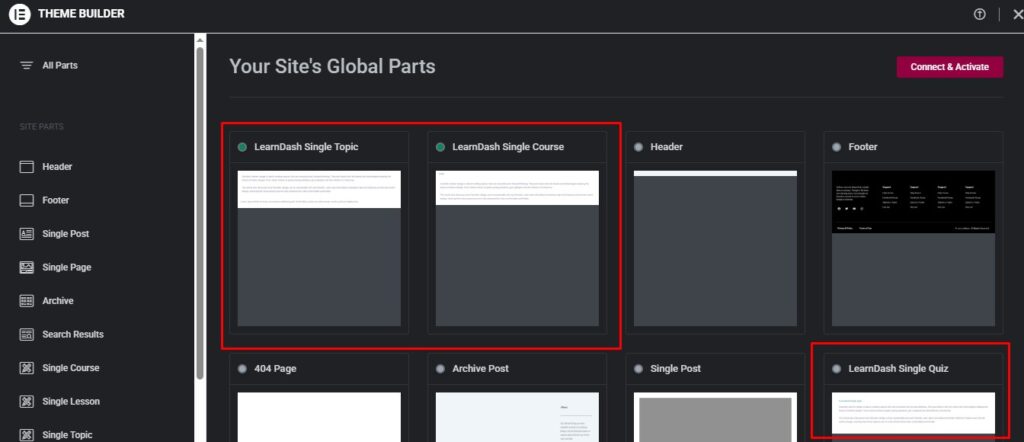
In my first test, I noticed the LearnDash-specific template options inside Elementor but did not fully appreciate what they offered. On my second attempt, working with these fixed page types made much more sense. Instead of just adding individual elements, I could use Elementor’s Theme Builder to customize the general structure of a course page, a lesson, a topic, or a quiz/assessment page.
The add-on therefore does two useful things: it provides LearnDash widgets that can be placed with drag and drop, and it connects LearnDash’s main page types with Elementor’s reusable template system. You can work on the layout as a whole while still adjusting supported elements, such as colors, typography, and buttons.
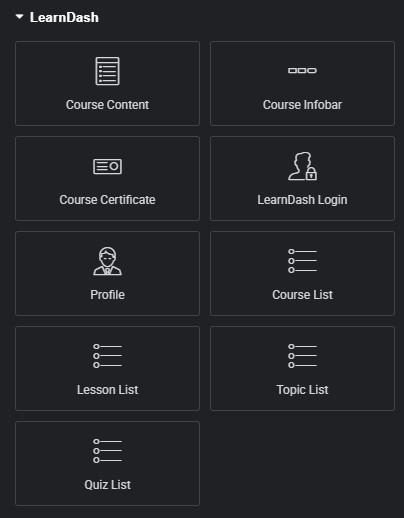
Useful LearnDash Widgets and Templates in Elementor
- Single Course template: Course Infobar, Course Content, and Course Certificate widgets.
- Single Lesson template: Lesson Infobar and Lesson Content widgets.
- Single Topic template: Topic Infobar and Topic Content widgets.
- Single Quiz template: Quiz Infobar and Quiz Content widgets for assessments.
- Other Elementor pages: Course List, Lesson List, Topic List, Quiz List, LearnDash Login, and Profile widgets.
Some of these widgets are convenient alternatives to inserting shortcodes manually. But the integration is not just a visual way to place shortcodes: its support for reusable page templates can make building and maintaining a consistent LearnDash site considerably easier.
Where This Add-on Falls Short 😞
My second test changed my view of the add-on, especially when it comes to global templates. However, there are still some limitations worth considering.
The additional LearnDash widgets are useful, but they do not give you complete visual control over every internal LearnDash component. Some areas still depend on LearnDash’s own markup, styles, and behavior, so more detailed changes may require custom CSS or other tools.
That distinction matters: the add-on is much better at giving you control over a page’s overall template and layout than at completely redesigning every LearnDash element within it. For many course websites, that is already a valuable improvement.
During my original test, I had problems getting changes to appear on lesson and topic pages, even after setting display conditions in Elementor’s Theme Builder. My more recent experience was significantly better, so I would no longer treat that initial issue as a general limitation of the integration. It is still worth testing the template and its display conditions carefully on your own setup.
I also encountered a conflict during my first test: an F.A.Q. block added through Gutenberg on a course page broke after I activated the add-on. That was my experience at the time, but I have not confirmed whether the problem was caused by the add-on itself or by an interaction with another part of the site’s setup.
I also collected comments from users on LearnDash videos, Elementor’s blog, and independent tutorials. I am keeping some of those reports below because they highlight real challenges people have encountered, but they should be read as historical user experiences, not proof that every issue still affects the latest versions.
- Other links:
- youtube.com/watch?v=HGRoCeuReCo
- youtube.com/watch?v=Uozg9HTf1Iw
- elementor.com/blog/learndash-integration
Some of these comments span several years and refer to different versions of LearnDash and Elementor. I experienced some similar frustrations in my first test, but my more recent experience was more positive. I would recommend checking whether a reported problem still occurs in your specific setup before treating it as an ongoing bug.
Missing Download Files and Lack of Template Support
One of the biggest frustrations in tutorial videos is when the instructor teaches how to build a beautiful layout in Elementor but never provides the file for download (.json).
What users say: several commenters (such as @arthurdavidson7360, @was955, and @SugarTravels) beg for it.
The impact: developers get stuck trying to recreate complex interfaces from scratch because the official documentation or the video does not provide the ready made structure.
Difficulty Scaling Global Layouts With Custom Fields (ACF)
Going beyond standard layouts with ACF (Advanced Custom Fields) or other dynamic fields can require additional configuration, especially if you want to reuse fields across different courses.
What users say: user @loiceokaday656 asks whether the custom fields created will carry over from course to course or whether they depend on each individual post.
Plugin conflicts with ACF: user @herekletechnology5943 reports content restriction errors (um_content_restriction) when trying to pull custom field keys inside Elementor.
Outdated Educational Material
Since the Elementor Pro and LearnDash interfaces change constantly, the lack of updated tutorials leads to a huge waste of time.
What users say:
Earlier Reports of Display Conditions Not Applying
Some users reported that their Elementor Pro templates were not appearing on lesson or topic pages despite having display conditions configured. I ran into a similar issue initially, although my later experience with the template system was much better.
What users say:
Another creator (@patwekaraftab) complains that they tried to create dynamic layouts for Groups (Groups or Archive Groups) in Elementor and the integration does not respond.
The Layout Breaks and Forces Full Screen With No Editing Option
LearnDash’s native layout conflicts with Elementor’s sections and containers, breaking out to full screen width without allowing any adjustments.
What users say:
Frustration Styling Specific Pages (e.g., Quizzes)
The integration does provide a Single Quiz template and quiz-related widgets. Still, designing the overall quiz page does not necessarily mean you can freely redesign every individual question, answer field, or interaction within the assessment.
This is an important distinction between customizing the quiz page template and customizing LearnDash’s internal quiz interface. The latter can require additional CSS or more specialized development.
Looking at these comments alongside my own tests, I still think there is room for improvement, especially in documentation and fine-grained styling. But after trying the add-on again, I no longer think it is fair to dismiss it as just a collection of shortcodes. The reusable Theme Builder templates are a genuinely useful feature.
Best Use Cases
I would now recommend this add-on to anyone already using Elementor Pro who wants consistent, customizable templates for LearnDash courses, lessons, topics, and quizzes. It is especially useful when you want to make one layout change and have it reflected across an entire content type. For smaller tasks, such as displaying a course list on a regular page, the widgets are convenient too. I would still test the templates with your theme, Focus Mode configuration, and other plugins before applying them across a live LMS.
Alternatives Worth Considering
LearnDash Design Plugin
If the goal is to customize LearnDash pages, this plugin does it by refining WordPress’s native global CSS. It does not conflict with Focus Mode, and you can make global edits, for example one setting that applies to every lesson. It offers several customization options.
LearnDash Visual Customizer
There is also the LearnDash Visual Customizer by SnapOrbital, which can be an alternative or complement depending on the kind of customization you need. It is actually integrated with Elementor as well, and it is useful for building pages from scratch. It offers the ability to add custom fields to lessons and topics, an estimated time for each lesson, a content type indicator with an icon, and a short text summary under each lesson title. The plugin also comes with ready made layout styles that can give your site a really interesting look, among other features.
Final Verdict
- If you already use Elementor Pro and want reusable layouts for LearnDash course, lesson, topic, and quiz pages, the LearnDash Elementor Addon is worth considering. Its Theme Builder integration is its main advantage, although some internal LearnDash elements still have styling limitations.
- If your goal is to adjust the CSS so that LearnDash looks clean, fast, and matches your site’s theme colors, use Design Upgrade for LearnDash.
- If your intention is to enrich the LMS with extra information (lesson duration, content type, timeline layout in the lesson list, widget areas in Focus Mode) without technical complications, the SnapOrbital Visual Customizer works very well.
Overall Rating
★★★★☆ 4/5 (provisional rating after my second test)
Have a question?
If you have any questions about the Elementor Add-on for LearnDash, or if you have had a different experience than mine, feel free to leave a comment below. I would be happy to hear your thoughts.
If you need a LearnDash developer to configure this addon on your LearnDash website and more, just say the word!