LearnDash VAT Setup in the UK: Payments and WooCommerce Explained
Hello! This is Wellington Duarte, your favourite LearnDash developer, and today I’m going to explain how I approach VAT settings inside WooCommerce and payment systems for online course platforms.
In my previous article, I explained VAT for people selling courses in the UK and EU. Here, I want to go a bit further and show you how I configure WooCommerce with LearnDash for UK clients, and where you need to be careful before switching on tax calculations.
Let’s get into it! ✈
Updated October 2026. This is a practical technical guide, not tax advice. Always confirm the VAT treatment of your courses and your business with a qualified UK accountant or tax adviser.
LearnDash native payment methods
LearnDash includes built-in payment integrations, so you can sell courses without automatically needing WooCommerce. In your WordPress dashboard, go to LearnDash LMS > Settings > Payments to check which gateways are available in your installation, including Stripe and PayPal.
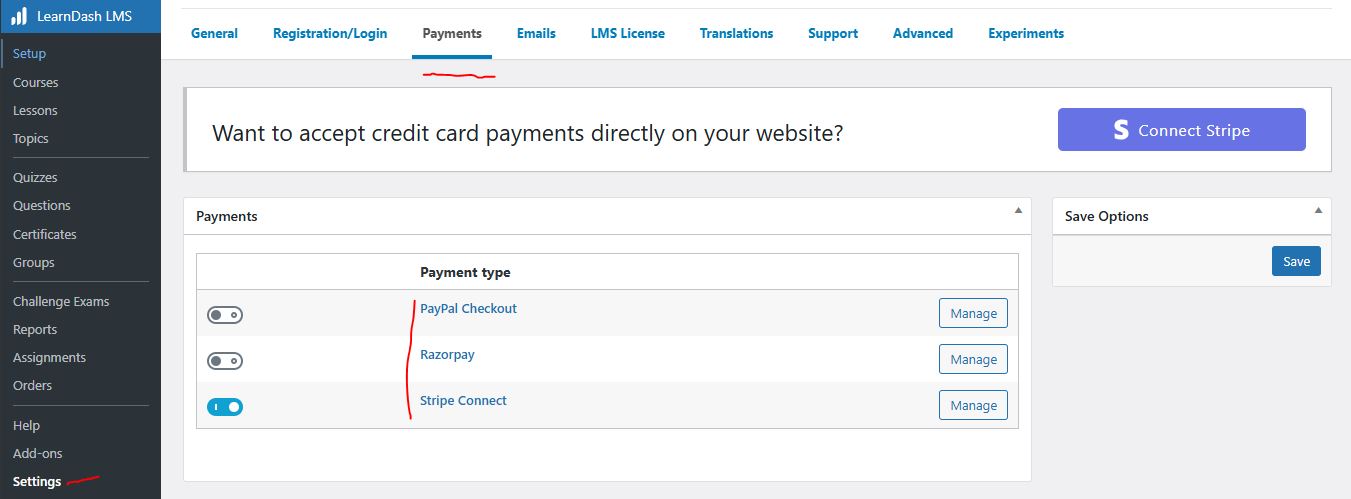
One important update concerns PayPal. LearnDash recommends moving from the older PayPal Standard (IPN) integration to PayPal Checkout. According to LearnDash, support for PayPal Standard ends in 2026.
Previously, PayPal Standard relied on Instant Payment Notification (IPN) to notify the website about completed transactions. Newer integrations use APIs and webhooks to exchange payment updates, reducing reliance on legacy systems.
A webhook is a message from the payment provider to your website when something happens, such as a successful payment or a refund. Modern integrations normally provide better tools for checking payment events and troubleshooting failures. However, webhooks are not infallible: you still need correct configuration, logging, and tests to make sure students receive access after successful payments.
Important for subscriptions: if you already have recurring payments through PayPal Standard, do not simply disconnect the old gateway. LearnDash says existing subscriptions cannot be transferred directly to PayPal Checkout; review its migration guidance first.
So, if LearnDash can already take payments, why do I often recommend WooCommerce?
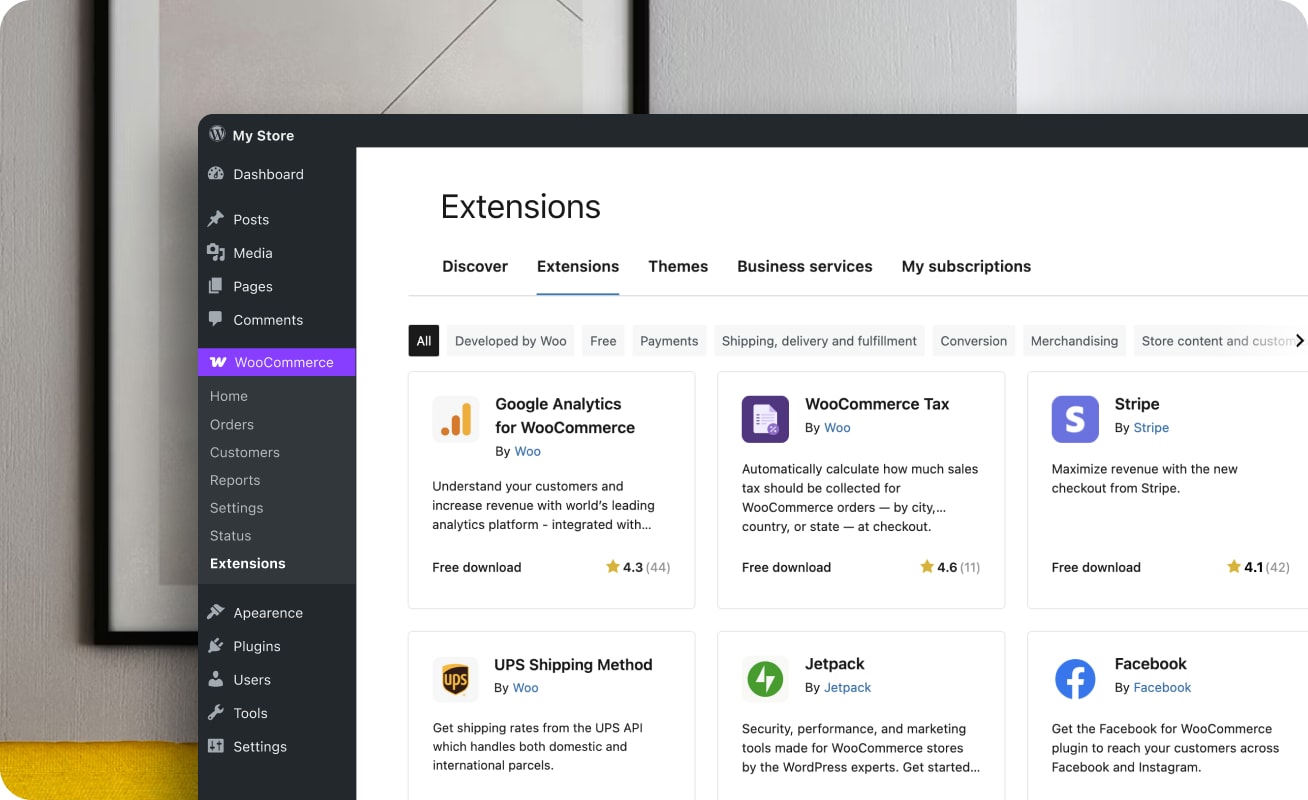
LearnDash + WooCommerce for UK-based course websites
LearnDash is primarily a learning management system. Its built-in payments work well for relatively straightforward course sales, and LearnDash also offers basic coupon and recurring payment features. But when clients need a more sophisticated eCommerce experience, WooCommerce provides a much more flexible foundation.
Some common limitations of using only a basic LMS checkout include:
- Limited shopping basket and multi-product checkout workflows.
- Less flexibility for advanced discount rules and promotional campaigns.
- More complex course bundles, cross-sells and upsells.
- Fewer options for integrating specialised tax, invoicing, B2B and marketing tools.
With WooCommerce, you can expand the platform with features such as:
- Automatic course enrolment after successful purchase, using the LearnDash WooCommerce integration.
- More control over checkout pages and order emails.
- Discount codes, a shopping basket and checkout optimisation.
- Cart recovery, cross-sells, upsells and course bundles, where supported by the relevant extensions.
- Instalment options, subscriptions and recurring access using compatible payment and subscription extensions.
- Cancellation, expiry and enrolment status rules.
- Multiple payment gateways, CRM connections and marketing automation.
- Sales funnels with tools such as CartFlows.
- Tax calculation, VAT number validation, invoices and reporting with the appropriate configuration and extensions.
- Optional payment methods such as Klarna and Clearpay, subject to merchant eligibility, country and gateway support.
You can still accept payments through Stripe and PayPal Payments. WooCommerce simply gives you more ways to manage what happens before and after checkout.
For VAT, remember this distinction: the payment gateway processes the payment; the store’s tax configuration or an integrated tax service calculates the tax. Connecting Stripe does not, by itself, make a course business VAT-compliant.
Check out my guide on how to hire a LearnDash Developer in the UK.
Before configuring VAT: check whether your courses are taxable
As of October 2026, the standard UK VAT rate is 20%, and the general UK VAT registration threshold remains £90,000 of taxable turnover over a rolling 12-month period (or if you expect to exceed the threshold in the next 30 days). Businesses can also register voluntarily. Rules for businesses established outside the UK differ: the £90,000 threshold generally does not protect a non-established business making taxable supplies in the UK.
However, not every online course automatically attracts 20% VAT. The correct treatment depends on who provides the education, what is being sold, the location of the customer and whether the supply qualifies for an education exemption. Certain eligible education providers and types of training can be exempt; ordinary commercial course sales are often standard-rated when UK VAT applies.
HMRC also distinguishes between automated digital learning (such as self-paced, pre-recorded videos and downloadable PDFs) and education delivered by a real teacher (such as live webinars or courses with meaningful live tutor support). That classification can change the place-of-supply rules for international transactions. Adding LearnDash or Zoom to a course does not, by itself, establish its VAT category.
For the official rules, see HMRC’s education and vocational training notice and its guidance on digital services.
Do not add VAT to your invoices as a separate tax if your business is not VAT-registered. Also, VAT-exempt education is not the same as a zero-rated sale. These distinctions must be reflected in the accounting and product tax settings.
WooCommerce + VAT
WooCommerce can support tax-inclusive or tax-exclusive pricing, tax rates based on customer location, and different tax classes. It can also work with services that automate calculations. But WooCommerce does not decide whether your business should be registered for VAT, whether a particular course is exempt, or where you must submit VAT returns.
For a UK-based, VAT-registered course provider selling standard-rated online courses to UK customers, 20% is the usual starting point. For cross-border sales, you must consider the course type, business-versus-consumer status and the rules of each destination country.
How to install WooCommerce and configure VAT for the UK
In your WordPress dashboard, go to Plugins > Add New Plugin, search for WooCommerce, and install and activate it.
Follow the setup wizard. Under WooCommerce > Settings > General, enter your real business location. If your business is established in the United Kingdom, use its UK address; do not choose the UK merely because you sell to UK students.
Next, select Enable tax rates and calculations under the tax settings in the General tab and save. You should now see WooCommerce > Settings > Tax.
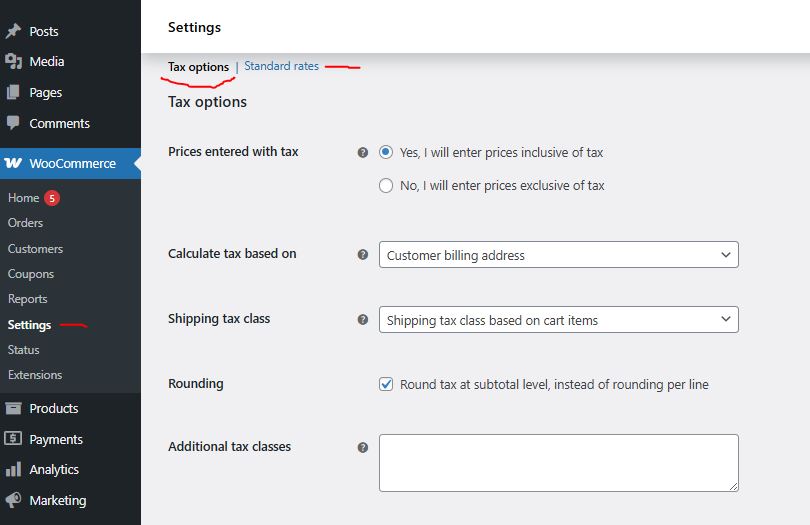
For a manual tax setup in a VAT-registered business, these are the main settings I review:
- Prices entered with tax: choose Yes, I will enter prices inclusive of tax if you want to enter gross consumer prices, or No if you prefer to maintain net prices. This is a business decision; do not switch the setting without checking existing product prices.
- Calculate tax based on: Customer billing address is often appropriate for automated digital courses, but confirm that it fits your legal place-of-supply rules and collect any additional location evidence required.
- Shipping tax class: the default is generally fine. Set course products to Virtual so WooCommerce does not unnecessarily request shipping details for online-only courses.
- Rounding: test the default per-line rounding and the optional subtotal method against your accounting requirements; neither option is universally the correct choice.
- Additional tax classes: create extra classes only if your products require them. A zero rate and a VAT exemption are not interchangeable.
- Display prices in the shop: Including tax is generally clearer for UK consumer sales where VAT applies. If your audience includes businesses and consumers, make the price presentation unambiguous.
- Display prices during cart and checkout: use a consistent approach so students see the actual amount payable. For example, a £50 net price plus 20% VAT is £60, not £70.
- Price display suffix: incl. VAT can work for applicable taxable products, but avoid a blanket label when selling across countries or when some courses are exempt.
- Display tax totals: Itemized can make it easier to show separate VAT lines and rate names.
For a simple manual UK rate, go to WooCommerce > Settings > Tax > Standard rates, add a row with Country code: GB, Rate %: 20.0000 and Tax name: VAT, then save. Apply this only to products that should actually be subject to the standard UK rate.
One extra detail: if you use WooCommerce Tax with automated taxes enabled, it may control the tax basis and require tax-exclusive price settings. Do not mix the manual instructions above with automated tax settings without checking how the extension works.
Finally, install the WooCommerce integration for LearnDash, link a WooCommerce product to the relevant course or group, and test both payment and enrolment. For paid products, the LearnDash course is generally configured with Closed access and the WooCommerce product manages the purchase.
How to configure VAT for EU and international students
This is where many LearnDash platforms become more complicated.
For automated digital courses sold to private consumers (B2C), the location of the customer generally determines where VAT is due. UK VAT is normally not charged on a qualifying digital service supplied to a consumer outside the UK, but VAT or a similar tax may still be due in that customer’s country.
For sales to EU consumers, a UK business may need to account for VAT at the applicable rate in the student’s EU country. Following Brexit, a UK business can generally use the EU’s non-Union One Stop Shop (OSS) scheme for eligible services or register in the relevant member states. OSS is a reporting and payment mechanism; entering EU tax rates into WooCommerce alone does not meet that obligation.
If you configure manual rates, look up the current official EU VAT rates first. You can import a verified, up-to-date CSV into the appropriate WooCommerce tax class, but I would not recommend relying on a static file from an older article: EU rates and local classifications can change.
For eligible B2B cross-border supplies, the treatment may instead involve a reverse charge or other business-customer rule. Collect and validate business and VAT information when relevant; do not automatically remove VAT just because someone types a company name at checkout.
For digital B2C transactions, you should also collect suitable evidence of the customer’s usual residence. HMRC explains the use of two pieces of evidence, such as billing address, IP address or payment-provider location data, when establishing where consumers belong. Store and protect records in line with the applicable VAT and data-protection retention requirements.
As for students outside the UK and EU, do not assume all sales are tax-free. Depending on the country, registration or collection of local VAT, GST or sales tax may be required. The correct answer depends on the jurisdiction, course classification, customers and sales volume.
If you regularly sell courses internationally, I generally prefer a tax tool designed for cross-border transactions instead of maintaining dozens of rates manually. WooCommerce Tax, Quaderno and other services can help with different parts of the process, but compare their country coverage, B2B handling, customer-location evidence, invoicing and filing features before choosing one.
Compliance and WooCommerce
For a professional LearnDash checkout in the UK, I also check a few details that are easy to miss:
- Invoices: consider a plugin such as PDF Invoices & Packing Slips for WooCommerce, but make sure your invoice template meets the relevant HMRC requirements. UK VAT invoices need the correct supplier details, VAT registration number, invoice numbering, dates and tax amounts, where applicable.
- VAT numbers: if you sell B2B, use a suitable method for collecting and validating VAT registration numbers when necessary. The WooCommerce EU VAT Number extension is one option.
- Marketing consent: keep optional marketing permissions separate from the purchase process and ensure that consent, when required, is freely given rather than pre-ticked.
- Privacy information: include a clear privacy policy and explain how billing and location data are processed.
- Records and returns: tax calculation and PDF invoices do not replace accounting, VAT returns or Making Tax Digital obligations for UK VAT-registered businesses.
- Student dashboard: create a clean My Account area so students can find courses, certificates, payment history and any downloadable invoices.
- Testing: place test orders as UK consumers, EU consumers, verified business customers and other international buyers. Check prices, tax lines, receipts, refunds and course enrolments.
Important note about live courses and tutoring
Live workshops, Zoom classes, tutor-led programmes and courses combining recorded content with meaningful human teaching may follow different VAT place-of-supply rules from automated digital courses. Some supplies of education can also qualify for exemption, depending on the provider and the activity.
For example, HMRC’s digital-services guidance treats a course made entirely of pre-recorded videos and PDFs differently from a course delivered through live tutor support. This matters especially when you sell internationally. If your LearnDash platform offers a mixture of self-paced courses, live teaching and B2B training, have a qualified adviser classify each type of supply before building the tax rules.
For reference, see HMRC’s rules for digitally supplied services and VAT Notice 701/30.
I hope this article is helpful. If you need a LearnDash Developer to set up WooCommerce payments, course enrolments, and the technical side of VAT configuration, please contact me. I can help implement the rules you have confirmed with your tax adviser and make sure the checkout and course access work properly.